Photoshop CS4 has a great new feature called the Pixel Grid. The pixel grid appears when you zoom past 500% and can help with editing at the pixel level.
You can control whether this grid is displayed or not using the View > Show > Pixel Grid menu option.
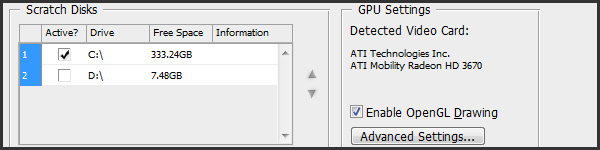
If you don't see the pixel grid menu option, then you most likely haven't got OpenGL enabled in your Photoshop preferences. To fix this, select the Edit > Preferences > Performance… menu option. Make sure that Enable OpenGL Drawing is checked.
I personally find the Pixel Grid really useful. Do you? Leave a comment, I'd love to hear.
Thanx Antony!
Great tip…. 🙂
Thanks Duane 🙂
Please help! I have CS4 and i want to have only grid, but not pixel grid and i can’t turn it off. It’s not checked View > Show > Pixel Grid. I even try to disable OpenGL so there’s no Pixel Grid in View > Show but it’s still there when i turn grid on and no, i’m not in 500% zoom. Any clue? Thx
Hi Kox, If there’s a grid displaying and you haven’t got the “Pixel Grid” option checked (within the View > Show > Pixel Grid menu option) then it’s most likely another grid that’s showing. Also, the Pixel Grid will only display after zooming in more than 500%. Check whether the View > Show > Grid option is checked. This will make a grid display whenever you’ve got it checked, no matter whether you’re zoomed in or not. 🙂
But can we snap to this Pixel Grid? I don’t see options for it anywhere. When designing a website I might transform a Vector Mask and I see that it’s possible to leave it in between pixel grid lines giving it a sub-pixel width. Know what I mean?
Hi John,
You can’t snap to the Pixel Grid but what you could do is turn on ‘Snap To Grid’ (View > Snap To > Grid menu option). Then, set up your grid preferences (Edit > Preferences > Guides, Grid & Slices… menu option) so that the Gridline is displayed every 1px (& 1 subdivision). You can then simply use the keyboard shortcut key to display/hide the grid as required. Hope this helps 🙂
Ha! So long, pesky pixel grid!
Thanks, Anthony. And you were right about the 10 seconds, too. 🙂
I know it’s a big date, but haven’t you jumped the gun (or the fireworks) a bit? As of right now I cannot find any calendar that will agree to more than 3 July… 🙂
I know it’s a big date, but haven’t you jumped the gun (or the fireworks) a bit? As of right now I cannot find any calendar that will agree to more than 3 July… 🙂
Erm well guess what, first the Pixel Grid option is not an option and now ENABLE OPEGL DRAWING isnt clickable!
How can this annoying grid be disabled forever for all files, by default in such a way, that I won’t ever see it again ?
Easy! Simply turn it off in the View > Show > Pixel Grid menu option.